
Download VOVSOFT Duplicate File Finder – Free, Secure Duplicate File Removal Tool for Windows & Mac
Looking for a reliable way to free up space on your PC? VOVSOFT Duplicate File Finder is a lightweight, free file management tool designed to help users identify and remove duplicate files across their system. Whether you're dealing with redundant photos, documents, or media files, this duplicate file finder software scans your hard drive or SSD using intelligent algorithms to detect exact and near-duplicate files.
With support for multiple comparison methods—such as file name, size, and content (SHA-1 hashing)—it delivers accurate results in seconds. The intuitive interface makes it ideal for both beginners and intermediate users. Easily add folders, set custom file masks, and filter results with just a few clicks.
Once duplicates are found, you can safely move them to the Recycle Bin for review before permanent deletion. Perfect for anyone seeking a secure, no-cost solution to optimize storage space, VOVSOFT Duplicate File Finder is a must-have tool for Windows and Mac users alike.
Why Choose VOVSOFT Duplicate File Finder? Powerful Features for Clean, Efficient Storage
VOVSOFT Duplicate File Finder stands out in the crowded field of duplicate file removal tools thanks to its smart blend of simplicity and functionality. Unlike many bloated applications, this software focuses on core performance—scanning, identifying, and helping you clean up duplicates—without unnecessary distractions. One of its standout features is the multi-layered comparison engine. You can choose to search based on file name, size, or even content using the SHA-1 hashing algorithm, which ensures that only truly identical files are flagged. This precision prevents accidental deletion of similar but unique files.
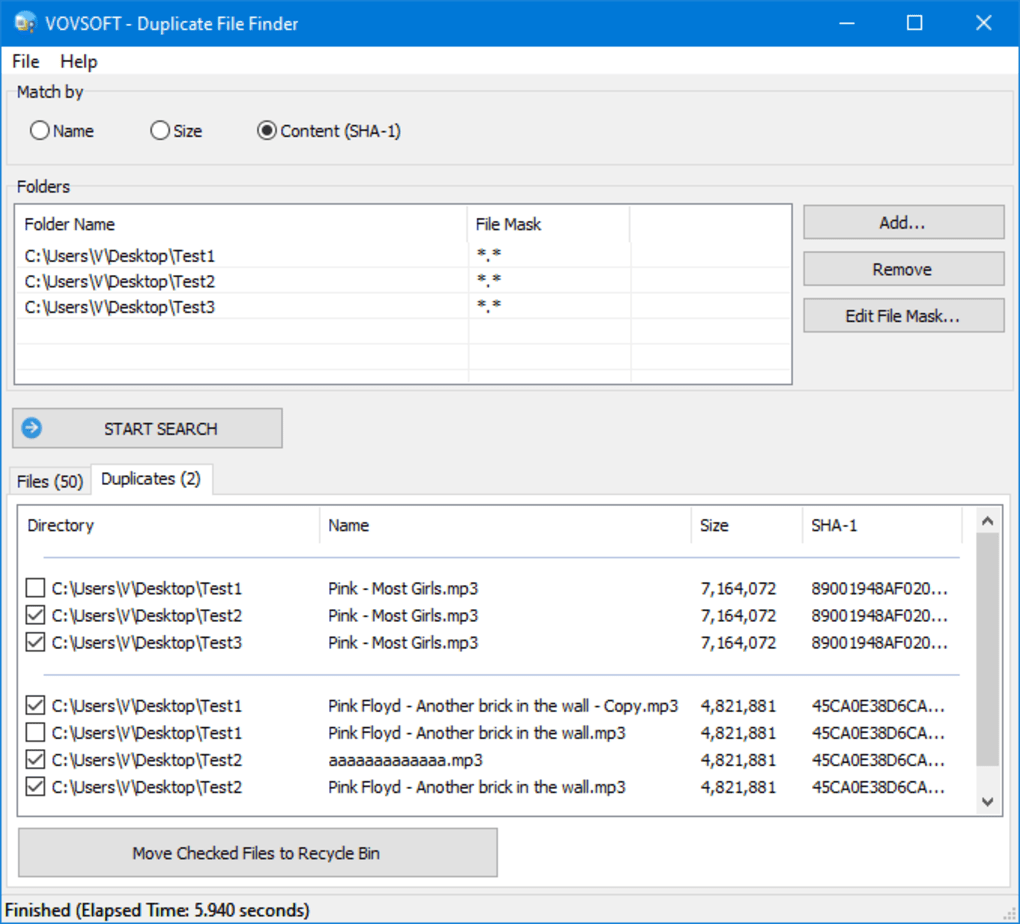
Another major advantage is the user-friendly interface. The entire tool operates within a single window, making navigation effortless. On the right side, you’ll find three clear buttons: Add Folder, Remove Folder, and Edit File Masks. This allows you to define exactly which directories to scan and which file types to include (e.g., .jpg, .pdf, .mp3). The top panel offers filtering options, letting you narrow down results by name, size, or content—perfect for targeting large duplicates like videos or high-resolution images.
The results are displayed in two tabs: Files and Duplicates. The Files tab shows all scanned content, while the Duplicates tab presents matched pairs with visual indicators. You can select multiple files using checkboxes and move them to the Recycle Bin with one click.
This safety net gives you the chance to review what’s being deleted before finalizing. Additionally, the tool supports exporting search results to a CSV file, which is useful for documentation or auditing purposes. Whether you're cleaning up a cluttered desktop or optimizing a work computer, VOVSOFT Duplicate File Finder delivers fast, accurate results with minimal effort.
How to Install and Use VOVSOFT Duplicate File Finder – Step-by-Step Guide
Getting started with VOVSOFT Duplicate File Finder is a breeze, especially for users who aren’t tech-savvy. First, visit the official website and download the installer for your operating system—Windows or Mac. The installation process is quick, requiring only a few clicks and no complex configurations. Once installed, launch the app, and you’ll be greeted with a clean, minimalist interface that’s easy to understand.
To begin scanning, click the Add Folder button and select the directories you want to analyze. Common choices include your Documents, Pictures, Downloads, and Desktop folders. You can add multiple folders at once to cover all areas where duplicates might hide. If you want more control, use the Edit File Masks option to specify which file types to scan (e.g., only .jpeg and .png files). This helps speed up the process and avoids scanning irrelevant files like temporary system files.
Next, choose your comparison method. For most users, selecting Content (SHA-1) is ideal, as it identifies files with identical data, even if they have different names. If you’re looking for exact name matches, go with the Name option.
You can also filter by size to focus on large duplicates, such as high-definition videos or large PDFs. After setting your preferences, click Start Scan. The software will begin analyzing your files in real time, displaying progress and estimated completion time.
Once the scan finishes, review the results in the Duplicates tab. Select the files you wish to remove by checking the boxes next to them. Then, click Move Checked Files to Recycle Bin.
This step is crucial—it gives you a final chance to review your selections. You can later restore files from the Recycle Bin if needed. For future reference, export the list of duplicates to a CSV file.
This makes it easy to track changes or share results with others. With these simple steps, you can reclaim valuable storage space in under 10 minutes.
Compatibility & System Requirements – Works on Windows, Mac, Android & iOS
VOVSOFT Duplicate File Finder is designed to be highly accessible, supporting a wide range of devices and operating systems. The primary versions are available for Windows 7 and later, including Windows 10 and Windows 11. It also runs smoothly on macOS, making it a versatile choice for users across different platforms. While there’s no native Android or iOS app, the software can be used on mobile devices through emulators or remote access tools, though this is not recommended for optimal performance.
The system requirements are minimal, ensuring compatibility with older machines. For Windows, you’ll need at least 1 GB of RAM and 100 MB of free disk space. On Mac, the app runs on macOS 10.12 or higher with similar RAM and storage needs. This lightweight footprint means the tool won’t slow down your system during scans. It’s especially useful for laptops with limited SSD space or older desktops struggling with clutter.
One of the best aspects of VOVSOFT Duplicate File Finder is its cross-platform accessibility. Whether you’re using a Windows PC at work, a Mac at home, or managing files across devices, this tool provides consistent performance. It doesn’t require a subscription or recurring payments—everything is free. The software updates regularly to improve detection accuracy and fix bugs, so you can always rely on the latest version. With no ads, no telemetry, and no hidden costs, it’s one of the most secure and trustworthy duplicate file finders available today.
Pros and Cons – Is VOVSOFT Duplicate File Finder Worth It?
- ✅ Pros:
- Completely free with no hidden costs or in-app purchases
- Lightweight and fast, with minimal impact on system performance
- Supports multiple comparison methods: name, size, and content (SHA-1)
- Intuitive interface—ideal for beginners and non-tech users
- Safe deletion via Recycle Bin with option to restore files
- Export results to CSV for documentation and tracking
- Regular updates for improved accuracy and stability
- ❌ Cons:
- Limited to desktop platforms (no native mobile app)
- No built-in backup or recovery feature for deleted files
- Advanced users may miss more granular customization options
- Only detects exact duplicates, not near-duplicates (like slightly edited photos)
- Basic interface lacks advanced sorting or filtering beyond the core options
Frequently Asked Questions (FAQ) – Your Guide to Using VOVSOFT Duplicate File Finder
- How do I download VOVSOFT Duplicate File Finder?
- Visit the official VOVSOFT website and click the “Download” button. Choose the version for your operating system—Windows or Mac. The installer is free and virus-free. Run the file and follow the on-screen instructions to complete installation.
- Is VOVSOFT Duplicate File Finder really free?
- Yes, VOVSOFT Duplicate File Finder is completely free to download and use. There are no premium features, no trial periods, and no hidden fees. You can scan, identify, and delete duplicates without paying a single cent.
- Can I recover files after deleting duplicates?
- Yes, the software moves selected duplicates to the Recycle Bin instead of permanently deleting them. You can restore any file from the Recycle Bin if you accidentally remove something important.
- Does it work on SSDs and external drives?
- Yes, VOVSOFT Duplicate File Finder works on internal hard drives, SSDs, USB drives, and external storage devices. Simply add the drive to your scan list and let the tool do the rest.
- How accurate is the duplicate detection?
- The tool uses SHA-1 hashing for content-based comparison, which is highly accurate for detecting exact duplicates. However, it does not detect near-duplicates (e.g., edited images). For such cases, consider using specialized tools like dupeGuru.
Final Verdict – A Must-Have Free Tool for Every PC User
If you’re looking to free up space on your computer without spending a dime, VOVSOFT Duplicate File Finder is an excellent choice. Its combination of speed, accuracy, and ease of use makes it one of the best free duplicate file finder tools available. Whether you’re a student managing a cluttered laptop, a professional organizing project files, or just someone tired of running out of storage, this software delivers real value.
While it lacks some advanced features found in paid competitors, its core functionality is rock-solid. The ability to scan by content, export results, and safely delete duplicates via the Recycle Bin sets it apart. Plus, with regular updates and no ads, it remains a secure and reliable option.
Download VOVSOFT Duplicate File Finder today and reclaim your storage space in minutes. It’s free, fast, and effective—what more could you ask for?







